- What is PixelMe?+
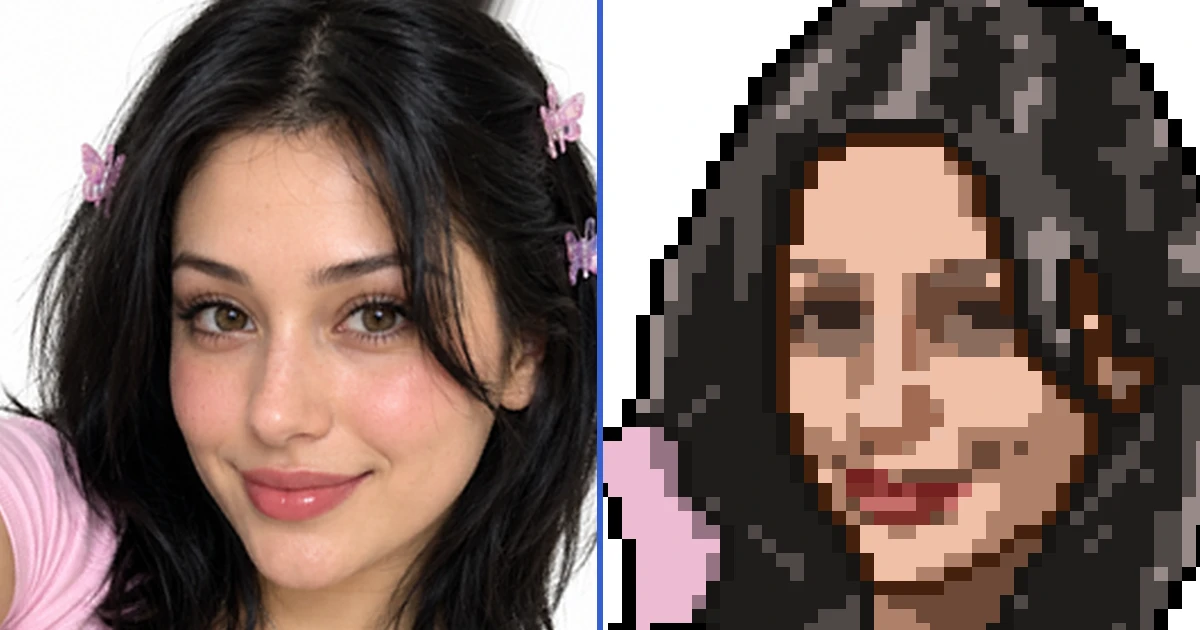
- PixelMe is a free online tool that uses AI to automatically generate pixel art from photos. Simply upload a portrait photo, and the AI detects the face and creates pixel art in multiple sizes. Use it for social media profile icons, game assets, bead patterns, cross-stitch charts, and more.
- Is PixelMe free to use?+
- Yes, the web version is completely free with no account registration required. The app version also offers basic features for free. By subscribing to the Pro plan, you can unlock unlimited AI Magic mode, remove ads, and remove watermarks.
- What types of images are supported?+
- PixelMe works with photos that contain a human face. The AI automatically detects the face and converts it into pixel art. There are no image size restrictions. You can also use Landscape mode to convert landscapes, pets, buildings, and other photos without faces.
- What is the difference between the web and app versions?+
- The web version offers face-detection pixel art conversion, color adjustments, bead pattern and cross-stitch chart generation, and smartphone wallpaper creation — all for free. The app version adds Stable Diffusion-based high-quality AI conversion (AI Magic mode), a pixel-level editor, color reduction, background removal, and Aseprite export.
- Is there a mobile app?+
- Yes, PixelMe is available on both iOS (App Store) and Android (Google Play). The app version offers advanced features not available on the web, including AI Magic mode (high-quality AI conversion), a pixel editor, and Aseprite export.
- Is my uploaded image data safe?+
- Yes, your privacy is protected. Your photos are never made public or shared with third parties. To check quality, a reduced copy of your photo and the result may be kept in PixelMe diagnostic storage.
- Can I create bead patterns or cross-stitch charts?+
- Yes, you can generate bead art patterns (for Perler beads, Hama beads) and cross-stitch charts from your pixel art on the web version. You can freely adjust the background color, spacing, scale, and rotation, and download the finished pattern. You can also create smartphone wallpapers.